TNVED Finder PRO — selection, verification, and export of TN VED codes for OpenCart 3


Description
TNVED Finder PRO — selection and accounting of TN VED codes in OpenCart 3
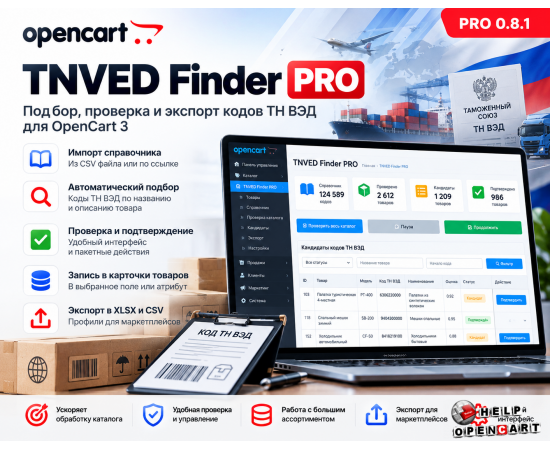
TNVED Finder PRO is a module for OpenCart 3 that helps systematize work with TN VED codes in your online store's product catalog. Import a code directory, check products, review suggested options, confirm suitable codes, save them in product cards, and generate exports for future use with marketplaces.
The module combines candidate search, manual verification, status management, recording of confirmed codes, and data export in a single administrative panel interface.

What is TNVED Finder PRO used for?
When working with a large product range, manually selecting and transferring TN VED codes can be time-consuming. Maintaining data consistency is especially challenging when a catalog contains hundreds or thousands of items.
TNVED Finder PRO helps you organize this process: browse the catalog, obtain possible code variants, verify them, and save the confirmed values in the selected product field or OpenCart attribute.
- Process the entire catalog, including disabled products.
- Use your own directory of TN VED codes.
- Get candidates based on supported product groups and text matches.
- Confirm and reject options manually.
- Save confirmed codes in product cards.
- Export verified data to XLSX or CSV UTF-8.

Import of the TN VED code directory
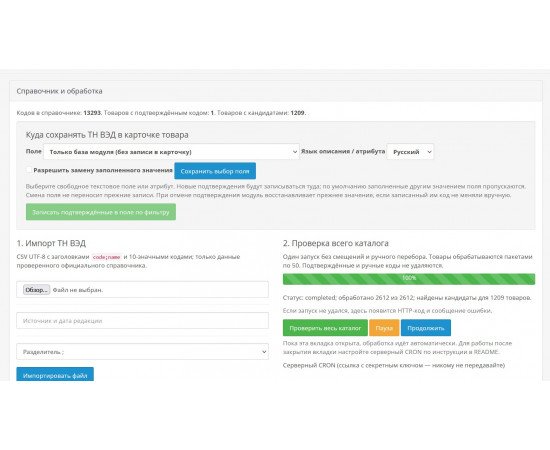
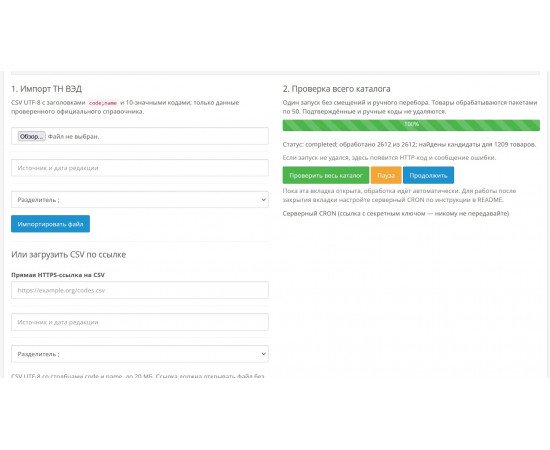
Upload the directory in CSV format or provide a direct HTTPS link to the CSV file. When importing, you can specify a semicolon or comma separator.
Each valid entry requires a ten-digit code and its name. The module validates the data, skips invalid lines, and displays the number of entries processed and skipped.
When re-importing, the existing code is updated and duplicates of the same code are not created. Records missing from the new file are not automatically deleted.
- Directory format: CSV UTF-8, including files with BOM.
- Maximum file size: 20 MB.
- Import by link: public HTTPS address without authorization and redirects.
- For each import, you can specify the source and edition of the directory.
Important: The module does not independently verify the source's authoritativeness or the directory's current revision. The current version does not feature scheduled automatic updates.

Scanning the entire OpenCart catalog
Launch a catalog check with a single click. The module processes items sequentially in batches of 50 items and saves the job status to continue processing where it left off.
The check includes both enabled and disabled products. The product name and description in the current language of the administrative panel are used for selection. If the name in this language is missing, the product is included in the processing, but selection for it is skipped.
The following actions are available during operation:
- Check the entire directory - start a new task from the beginning.
- Pause - pause further processing.
- Resume - resume a paused task.
While the module page is open, subsequent batches are processed via AJAX. For work after the page is closed, a server-side CRON is provided: the module provides a personal handler link that can be called on a schedule. Each time the task is run again, the secret key for the link changes.
How does code selection work?
The algorithm uses recognition rules for supported product groups and textual comparison of product names and descriptions. External neural networks and paid AI services are not used.
Tents, marquees, awnings, sleeping bags, and safes have separate product group rules. Supported refrigerators, car refrigerators, and freezers are subject to text comparison within the relevant product group.
By default, the module suggests up to four product candidates. If there is insufficient data or an ambiguous set of options is found, the result may be empty.
The algorithm does not automatically analyze images, attributes, and technical documentation. It also does not cover the entire product range: some products, including certain types of heaters, air conditioners, stoves, grills, and SUP boards, may require additional information.
Important: The proposed code is a candidate for verification, not a confirmed customs classification result. The final selection is made by the user.
Candidate list and filters
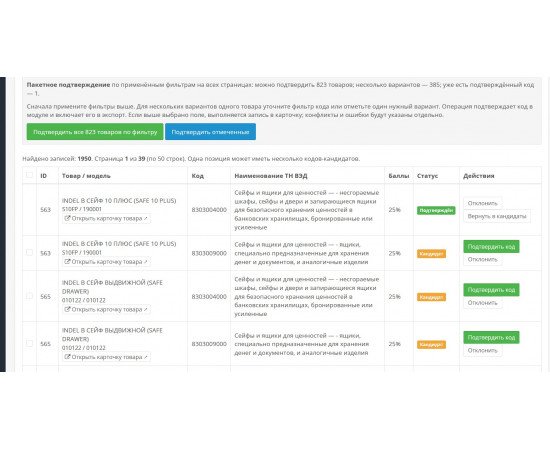
For each product-code relationship, the product ID, name, model, SKU, suggested code, product name, rating, status, and available actions are displayed. A single product with multiple variants is displayed across multiple rows.
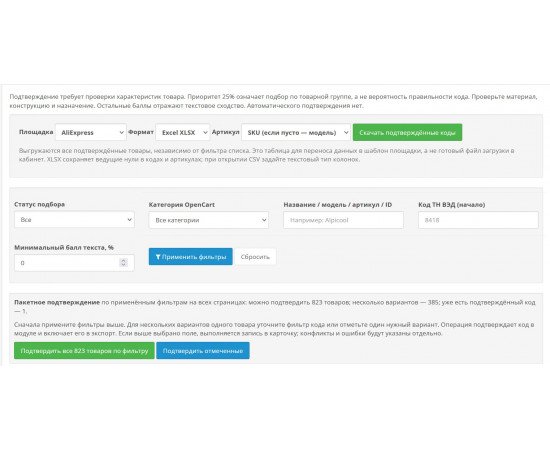
For convenient checking, filters are available by:
- status - candidates confirmed, rejected or all;
- product categories;
- name, model, SKU or ID of the product;
- the beginning of the TN VED code;
- minimum assessment of the candidate.
Up to 50 rows are displayed on a single page. From the results row, you can open the product card in a new tab.

Each option has one of three statuses: candidate, approved, or rejected. Approval and rejection are performed by explicit user actions.
- Confirm code - select an option for the product.
- Reject - exclude an unsuitable option.
- Revert to candidates – make the option available for consideration again.
One confirmation code is assigned per product. If another product is confirmed only once, the previous confirmation is rejected.
Batch confirmation
To speed up the check, you can confirm the selected lines or all suitable candidates based on the current filters, including on other pages of the list.
Before a batch operation, the module displays the number of products available for confirmation, ambiguous items, and products with an already confirmed code.
- Only candidates are confirmed.
- An item with multiple selected options is skipped as ambiguous.
- The existing confirmation is not automatically replaced.
- Rejected options are not automatically confirmed.
Saving the code to the product card
Select where to store the confirmed TN VED code:
- only in the module database;
- in the available text field of the product - UPC, EAN, JAN, ISBN, MPN and other suitable fields;
- in the description text field;
- in an existing attribute;
- in the new attribute "TN VED".
You can select the recording language for the description and attributes. A new attribute is created in the "Customs Data" group. If an attribute named "TN VED" already exists, the module uses the found attribute.
Confirming the code in the module's database and writing the value to the product field are processed separately. After the operation, the result is displayed: whether the value has been written, whether it matches, whether a conflict has been detected, or whether an error has occurred.
Data protection and restoration
By default, the module only writes the code to an empty field. If the same code already exists there, it reports a match. If the field contains a different value, the entry is skipped.
A separate checkbox is provided to replace the existing value. The module also saves the previous value and the last code it recorded, so that if you cancel the confirmation, the previous contents can be restored.
Restoration is performed only if the field still contains the code written by the module. If the value is later manually changed, this change is not overwritten by the old value.
Manual search and addition of code
You can search for codes in the directory by the value itself or by a fragment of the name. To add a code manually, enter the product ID and an existing ten-digit code in the downloaded directory.
The added variant is given candidate status. To include it in the export and use it as a verified code, verify it separately.
Re-screening and clearing of candidates
During a new scan, the module automatically updates any unconfirmed suggestions. Confirmed, rejected, and manually added connections are preserved.
A separate purge allows you to remove automatic unconfirmed candidates without affecting confirmations, rejections, manual links, or the codebook itself.
Export of verified codes
Generate tables with verified codes for further data preparation for marketplaces. AliExpress, Yandex Market, Beru, and MegaMarket profiles are available, as well as XLSX and CSV UTF-8 formats.
The download includes the OpenCart product ID, the selected article number, the product name, the confirmed TN VED code, and the code name.
You can select the source of the article:
- SKU, and if SKU is empty, the model;
- model;
- Product ID.
All confirmed products are included in the export, regardless of the results list filters. In XLSX, codes and SKUs are saved as text, including leading zeros.
Please note: these exports are intended for data transfer and further preparation. They are not guaranteed to be ready-to-use official templates for direct upload to marketplace dashboards. The current version does not support sending products via the marketplace API.
Key benefits of TNVED Finder PRO
- Working with the TN VED directory within the OpenCart 3 administrative panel.
- Import a directory from a CSV file or via a direct HTTPS link.
- Batch scan of a directory with progress saving.
- Continue processing via CRON after the page is closed.
- Selection of candidates based on supported product groups and text matches.
- Manual verification and batch confirmation with handling of ambiguous results.
- Recording confirmed codes into selected fields and product attributes.
- Protection of filled values and the ability to restore previous data.
- Export of verified codes to XLSX and CSV UTF-8.
How to get started
- Import the TN VED code directory.
- Select a field or attribute to store codes.
- Run a full directory scan.
- Research candidates and check for controversial items.
- Confirm the applicable codes one by one or in batches.
- Check the results of recording in product cards.
- Download verified data to XLSX or CSV.
Important note
TNVED Finder PRO helps you organize the selection, verification, storage, and export of TNVED codes. This module does not replace professional customs classification and does not guarantee the legal accuracy of the codes provided. Before using the data in documents or when working with marketplaces, please verify that the code matches the specific product.