
Competitor Price Monitoring in OpenCart: How to Automate Market Analysis
Competitor Price Monitoring in OpenCart: How to Automate Market Analysis
Product pricing is one of the factors that influence a customer's purchasing decision. When competitors change their prices, launch promotions, or discontinue products, online store owners need to identify these changes promptly and assess how they affect their own offers.
For a small product catalog, checking prices manually may be manageable. However, when a store has hundreds or thousands of products and several competitors, this process becomes time-consuming. Manual checks can also make it difficult to identify changes quickly.
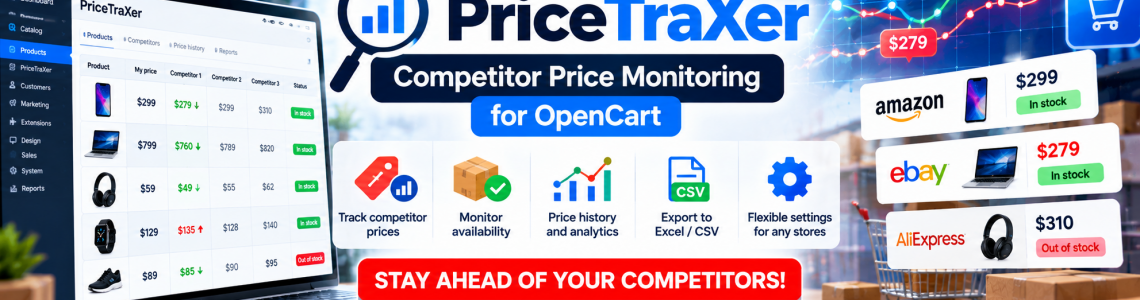
One way to automate this process is to use PriceTraXer, a tool designed for competitor and supplier price monitoring.
Why Is It Important to Monitor Competitor Prices?
Imagine an online store selling electronics, automotive accessories, or household appliances. The same product may be available from several retailers, with prices and availability changing regularly.
If you rely exclusively on your own prices and check competitors' websites only occasionally, you may miss important market changes.
Regular price analysis can help you:
Monitor price competitiveness. Compare your prices with offers from other sellers.
Identify market changes. Track increases and decreases in product prices.
Monitor product availability. Check whether competitors or suppliers still have particular products available.
Make better-informed decisions. Use historical price data when reviewing your pricing strategy.
Save time. Reduce the amount of manual work required to monitor large numbers of product pages.
However, offering the lowest price is not always the best strategy. Pricing decisions should also account for purchase costs, logistics, marketplace commissions, taxes, and target profit margins.
PriceTraXer: Price and Availability Monitoring
PriceTraXer is designed to automate the monitoring of competitor and supplier prices. It allows users to collect information from product URLs, track price and availability changes, and analyze the resulting data.
Collect Prices from Competitor and Supplier Websites
Instead of repeatedly visiting dozens of websites, you can organize data collection using predefined product URLs.
This is particularly useful for stores selling popular products offered by multiple retailers or for businesses that regularly compare supplier prices.
PriceTraXer supports monitoring multiple stores and sources, adding products, and regularly updating collected information. The ability to configure monitoring for specific websites helps users organize the process around the sources they need to track.
Monitor Product Availability
Price is not the only factor worth tracking when analyzing the market.
For example, a competitor may offer a lower price but have the product out of stock. Alternatively, a supplier may temporarily stop selling a popular item.
PriceTraXer allows users to monitor product statuses such as "In Stock" and "Out of Stock" and identify changes in the product offerings of monitored websites.
This information can be useful when working with suppliers, managing product assortments, and operating a dropshipping business.
Track Historical Price Changes
A single price check shows the market situation at one particular moment. Historical data helps you understand how prices change over time.
PriceTraXer provides price history tracking, allowing users to analyze price movements, compare competitor prices with their own, and review visual representations of price increases and decreases.
This helps answer practical questions:
How frequently do competitors change prices for popular products?
Which products experience significant price fluctuations?
How does our offer compare with those of other sellers?
Which changes should be investigated before adjusting our own prices?
When analyzing prices, always consider when the data was collected and ensure that you are comparing equivalent products, configurations, and sales conditions.
How to Use Price Monitoring in an Online Store
Collecting information alone does not guarantee increased sales. The results depend on how your business uses the data.
Step 1. Select Products to Monitor
You do not necessarily need to monitor your entire catalog immediately. Start with best-selling products, highly competitive items, and products whose prices are particularly important to customers.
This makes it easier to evaluate the value of monitoring and identify the areas that deserve the most attention.
Step 2. Add Product URLs and Monitoring Sources
PriceTraXer allows users to add products and links to websites they want to monitor.
At this stage, accurate product matching is essential. Products with similar names are not always identical: they may differ in configuration, specifications, package size, or warranty conditions.
Step 3. Organize Regular Data Collection
PriceTraXer supports scheduled monitoring. The frequency of checks should depend on how quickly prices change in your market and on the characteristics of the websites being monitored.
You should also consider the restrictions and terms of the websites from which information is collected.
Step 4. Analyze the Results
Use the collected information to compare prices, study price movements, and monitor product availability.
PriceTraXer provides reports on products and competitors, price history, and visual analytics.
Results can be exported to Excel or CSV or sent to a server. This allows you to incorporate the collected information into your existing analytical workflows.
Step 5. Make Decisions Based on Your Store's Economics
If a competitor lowers a price, you should not automatically follow suit.
First, review your own costs, selling expenses, and minimum acceptable profit margin. In some cases, maintaining your current price, highlighting product advantages, or adjusting prices for selected product categories may be a better strategy.
Price monitoring provides information for decision-making, but it does not replace profitability calculations.
Who Can Benefit from PriceTraXer?
The tool may be useful for several types of businesses and professionals.
OpenCart store owners. Monitor competitor prices and identify changes in the market.
Dropshipping businesses. Track product availability and pricing from suppliers.
Wholesalers and distributors. Analyze competing offers and monitor market pricing conditions.
Marketers and analysts. Prepare price comparisons, study pricing trends, and develop pricing recommendations.
Product assortment managers. Track product availability and changes in the offers listed on monitored websites.
Local Data Storage and Working with Results
According to the PriceTraXer product description, collected data is stored locally on the user's computer rather than being transferred to third parties. Monitoring results can be exported to Excel and CSV or sent to a server.
This approach allows users to work with the information within their own workflows and prepare reports for further analysis.
Before deploying the tool in a specific environment, check its requirements, available execution methods, and compatibility with your intended workflow.
Why Is Automated Price Monitoring Better Than Manual Checks?
Manual analysis may be sufficient when monitoring a small number of products and competitors. However, as the catalog grows, checking numerous product pages becomes increasingly time-consuming.
Automation helps organize data collection, monitor selected products regularly, and analyze changes in prices and availability.
It is still important to configure monitoring sources correctly, ensure that products are matched accurately, and periodically verify the quality of the collected data.
Where to Find PriceTraXer for OpenCart
If you want to organize competitor and supplier price analysis, take a look at PriceTraXer — Competitor Price Monitoring for OpenCart.
Visit the module page to review its description and features, check the price, and ask questions before purchasing.
Conclusion: Regular price and availability monitoring helps businesses understand their competitive environment and make data-driven decisions. PriceTraXer helps automate information collection from monitored websites and use the results to analyze product assortments and pricing strategies.
Module in the topic
Leave a Comment