Redirect Universal for OpenCart


Download-Redirect Universal for OpenCart
Available Options
Description
Instructions for the Universal Redirect module for OpenCart
Redirect Universal is a convenient module for OpenCart that allows you to easily manage redirects on your site without editing the .htaccess file. It is especially useful for:
- changing the URL structure (SEO optimization, switching to CNC)
- Migrating a website from another CMS to OpenCart
- deleting old pages/categories/products
- fixing broken links
- temporary redirects (for example, promotions, sales)
The module supports regular expressions , which makes it very flexible.
| OpenCart | Compatibility |
|---|---|
| 2.x | Yes (2.0–2.3) |
| 3.x | Yes (3.0+) |
| 4.x | Partial (needs verification) |
Languages: Russian and English.
Installing the module
- Download the module archive from the website (for example, opencart-help.net).
- Go to the OpenCart admin panel → Extensions → Install extensions (or "Extension Manager").
- Click the Upload button → select the .ocmod.zip or .zip file.
- Wait for the message "The extension was installed successfully" .
- Go to Extensions → Modifiers → click the blue Refresh button.
- Go to Extensions → Modules → find Universal Redirect → click Install (if required).
- Then click Edit to go to settings.
Basic module settings
After installation, you will see several tabs:
1. Basic settings (Dashboard / Home)
- Module Status - Enable/Disable
- Sorting order - Usually left at default
- Redirect cache - Recommended to enable (speeds up work on large lists)
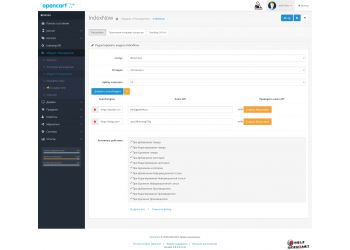
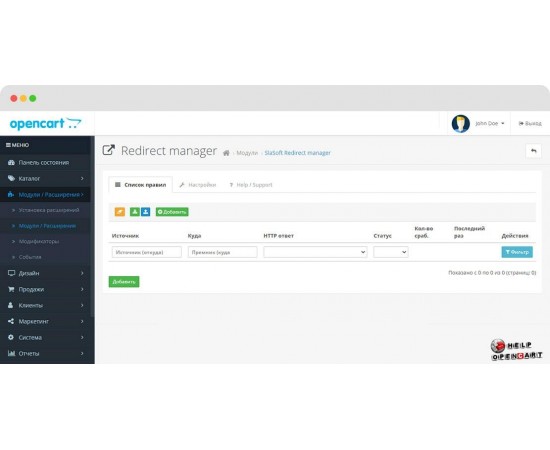
2. List of redirects
Here is a table of all redirection rules.
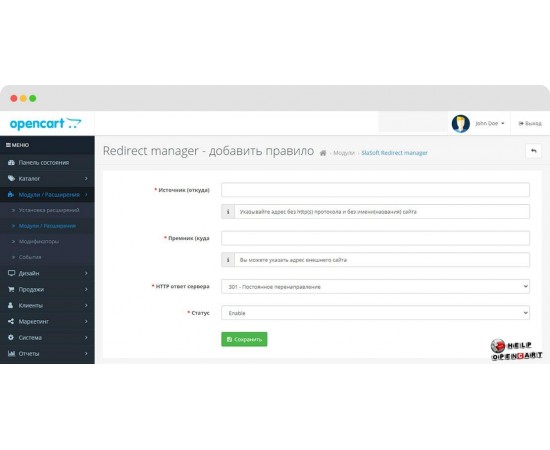
| Field | Description |
|---|---|
| From URL | Old address (from which to redirect) |
| To URL | New address (where to redirect) |
| Redirect type | 301 - Permanent (most important for SEO) 302 - Temporary 410 - Page removed 404 - Not found 403 - Forbidden |
| Regular | Checkbox - enable support for regular expressions (PCRE) |
| Status | Turn on/off a specific rule |
| Sorting | Execution order (less → earlier) |
Buttons:
- Add - new rule
- Delete - delete selected
- Import/Export - CSV file (very convenient for large lists)
3. Import / Export
The module allows you to download and export rules in CSV format.
Example of CSV structure (UTF-8 encoding):
from_url,to_url,redirect_type,regex,status,sort_order/old-category/,/new-category/,301,0,1,10/old-product-123/,/catalog/product-456/,301,0,1,20/.*old-brand.*/,/brands/,301,1,1,304. Additional settings (in some versions)
- Ignore GET parameters - redirect even if ?utm=...
- Redirect only 404 - the module only works on non-existent pages
- Logging redirects is useful for debugging.
Examples of use
| Task | From URL | To URL (where) | Type | Regular? |
|---|---|---|---|---|
| Category transfer | /old-category/ | /new-category/ | 301 | No |
| Removing old product | /product/old-product-123 | / (to the main page) | 410 | No |
| Transfer of all brand pages | /brand/nike/ | /brands/nike/ | 301 | No |
| Removing all old filters | /category/filter/.* | /category/ | 301 | Yes |
| Redirect from the old domain (internal) | /old-page.html | https://new-site.ru/new-page | 301 | No |
| Remove www and redirect to https | .* | https://site.ru/$1 | 301 | Yes |
| All pages of the type /page-123 → /catalog/... | /page-([0-9]+)/ | /catalog/page/$1 | 301 | Yes |
Important example with regular expressions: Redirect all old pages like /news/2020/post-123 → /blog/post-123
From: ^/news/[0-9]{4}/(.*)$To: /blog/$1Тип: 301Регулярка: ✓Helpful tips
- The order of the rules matters - put more specific rules higher (lower sort_order).
- Test on a staging server - an incorrect redirect can create an infinite loop.
- Don't redirect to a 404 page - it's better to redirect to a 410 or 301 page on a relevant page.
- Use 301 only if the page has truly moved permanently.
Regular expressions
- - begin and end without slashes / - the module adds them itself.
Common mistakes and their solutions
| Problem | Solution |
|---|---|
| The redirect doesn't work. | Have you updated the modifiers? Enabled the module? Is the rules order correct? |
| Infinite redirection | Make sure that From does not fall under To and vice versa |
| Redirection only works without www | Add a rule for both options or enable "Ignore GET" |
| The module conflicts with SEO Pack | Try disabling built-in redirects in SEO modules. |
Conclusion
Universal Redirect is one of the most powerful yet simple tools for managing URL structure in OpenCart. It allows you to seamlessly migrate stores, improve SEO, and eliminate thousands of 404 errors.
If you have any questions about specific rules or complex redirects, let me know and I'll help you create the right regular expressions!