Stickers-stickers for OpenCart products



Download-Module Stickers for OpenCart products
Available Options
Description
# OpenCart Product Stickers: Full Module Description
In the modern world of online trading, an important element of marketing is the visual design of products. One of the most effective ways to attract the attention of buyers is product stickers. The module for OpenCart, which provides such functionality, allows online stores not only to highlight their products, but also to improve their perception. In this article, we will consider in detail how this module works, what functions it provides and how it can help your business develop.
## What are Product Stickers in OpenCart?
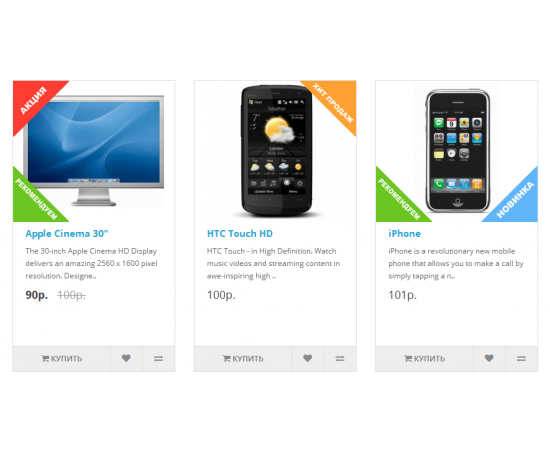
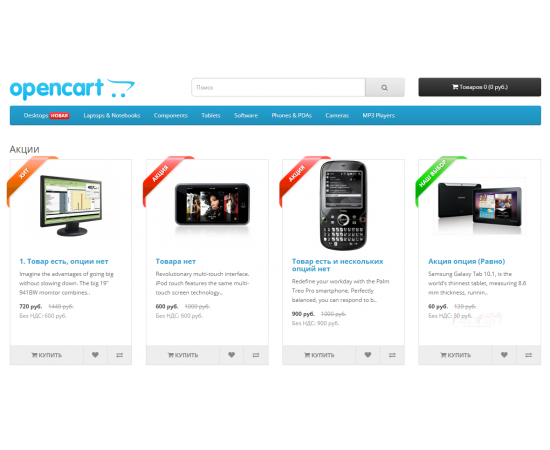
Stickers are graphic elements that are added to the product image in an online store. They can contain text messages such as "Discount", "New", "Bestseller", as well as visual elements that make the product more attractive to buyers. The appearance of such stickers on the product page attracts the attention of users and contributes to a higher conversion rate.
OpenCart has a variety of modules that make it easy to add these stickers to your product pages. Many of them are highly customizable, allowing you to tailor them to your store's style and branding requirements.
## Benefits of Using Stickers
There are several significant benefits to using stickers in your online store. The first and most obvious is that it attracts attention. When browsing through a list of products, shoppers tend to pay attention to visual elements. Stickers help differentiate products from competitors and draw attention to offers that can be extremely important for achieving a successful sale.
Stickers can also convey key information about products. For example, a "20% off" sticker immediately informs the customer about a bargain, while "New" emphasizes the freshness of the product. This way, you can control the perception of your offers and direct customers to relevant products.
Finally, stickers can be an important part of your brand if you use them consistently across all of your marketing strategies. A unique sticker style can help shape your store’s visual identity and cement it in your customers’ minds.
## How to install stickers module in OpenCart?
First, to install the sticker module, you will need access to your OpenCart admin panel. There are several steps you need to follow to successfully integrate the module:
First, make sure you downloaded the sticker module from a trusted source. This could be the official OpenCart module store or trusted third-party developers. Once the file is downloaded, you need to upload it to the modules area in your admin panel.
Once the module is downloaded, activate it by going to Extensions → Modules. Find your module and make sure it is enabled. In most cases, you will also need to configure basic module settings, such as the stickers that are displayed, their style, and where they are placed on the product page.
## Setting up stickers
Once the module is activated, you will need to configure the stickers. This includes choosing the style, fonts, and colors for the stickers, as well as defining the conditions under which they will be displayed. Most modules allow you to:
1. Select different stickers for different products and categories.
2. Set conditions for displaying the sticker, for example, at a certain price, the presence of promotions or news.
3. Set the duration of the sticker display so that it automatically disappears after the discount or promotion ends.
This flexibility in customization allows online stores to tailor their offerings to the specifics of their business and the preferences of their target audience.
## Examples of using stickers
There are various ways to use stickers that can greatly enhance your online store marketing. For example, if your store is running a sale, using "Discount" stickers on the product will help customers navigate and find great deals faster.
"New" stickers are ideal for launching new products. They will attract the attention of those customers who are always looking for something new and interesting. Various promotions, such as "2 for the price of 1" or "Products of the month", can also be highlighted with special stickers, which will help improve conversion and attract new customers.
## SEO optimization of stickers
An equally important aspect is the SEO optimization of stickers. Although stickers are primarily visual elements, their correct use can have an impact on search engines. For example, the text you use in stickers can affect the indexing of your site.
It is important that the stickers contain keywords that are associated with your products. This will help increase the visibility of your online store in search engines. By directing customers to specific products using keywords, you not only increase the likelihood of their purchase, but also create additional traffic paths on your site.
One of the most important steps in using stickers is to analyze their effectiveness. This may include using analytics tools to assess what percentage of purchases are due to stickers, as well as how they affect the overall time customers spend on the site.
To do this, you can use tools like Google Analytics to track user behavior. Pay attention to the pages with stickers and determine which ones are performing best. Based on this data, you can adapt your strategies and make adjustments to the use of stickers.
## Conclusion
Product stickers in OpenCart are a powerful tool for online stores looking to improve their competitiveness. They help highlight products, attract customers' attention, and convey important information. Setting up the module does not require specific knowledge and is available to every user, even those who are just starting out in e-commerce.
By following the above recommendations, you will be able to effectively integrate stickers into your online store and get visible results. A simple visual indication can be a decisive factor in a purchase, and the correct use of stickers will allow your business to develop and attract new customers.
Specifications
| Add-ons and extensions | |
| Совместимость | OpenCart 2.x, OpenCart 3.0.x, OCStore 2.x, OCStore 3.0.2.0 |